The right person for every decision.
Cashiers sell. Supervisors approve. Managers run the store. The register knows the difference, and a supervisor can approve on the cashier's own register without anyone signing out.
Who can do what
The plugin adds POS Cashier and POS Supervisor roles to WordPress. Shop managers and administrators can do everything. You can change any role, and upgrades never undo your changes.
| Task | POS Cashier | POS Supervisor | Shop manager or admin |
|---|---|---|---|
| Sell, and take card and cash | Yes | Yes | Yes |
| Park and recall sales | Yes | Yes | Yes |
| Cash paid in | Yes | Yes | Yes |
| Change a price | With a supervisor’s PIN | Yes | Yes |
| Give a discount or use a coupon | With a supervisor’s PIN | Yes | Yes |
| Return items and give refunds | With a supervisor’s PIN | Yes | Yes |
| Ring up a tax-exempt sale | With a supervisor’s PIN | Yes | Yes |
| Take an other payment | With a supervisor’s PIN | Yes | Yes |
| Cash paid out and no sale | With a supervisor’s PIN | Yes | Yes |
| See expected cash before closing | No | Yes | Yes |
| Sales reports | No | Yes | Yes |
| Approve with a PIN | No | Yes | Yes |
| Set up a device as a register | No | Yes | Yes |
| Receipt printer and reader display | No | Yes | Yes |
| Locations, registers and settings | No | No | Yes |
| Training mode and staff location access | No | No | Yes |
Coupons you list as allowed without approval don’t need a supervisor. Cashiers never get wp-admin access, or WordPress permissions for orders and customers.
Approval with a PIN
On the cashier's register
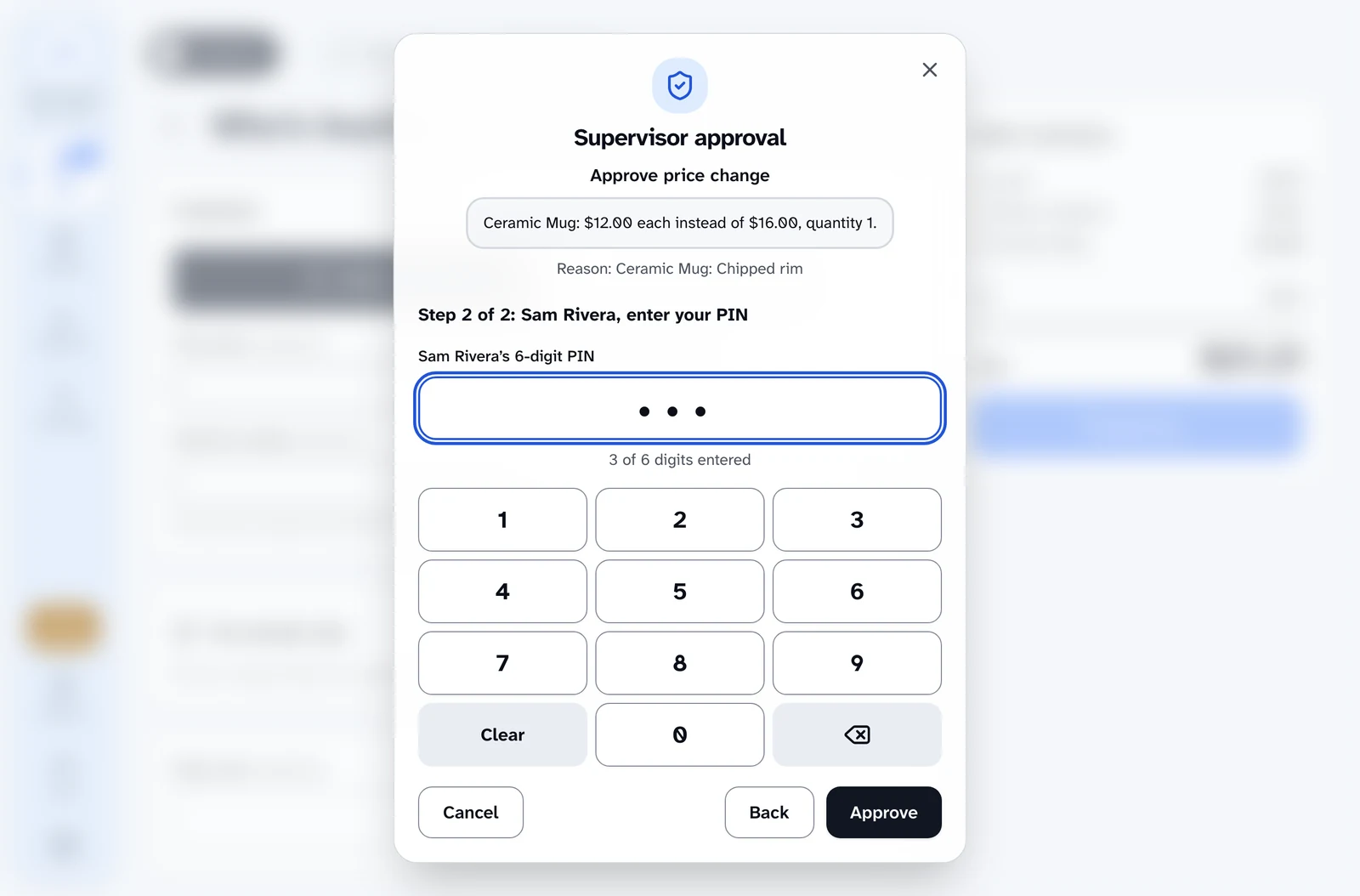
A supervisor approves price changes, discounts, returns, tax exemptions, other payments, cash paid out and no sale without anyone signing out.
Two clear steps
Choose who is approving, then enter their 6-digit PIN with the keyboard or the on-screen keypad.
Approves exactly what was shown
An approval is used once, lasts two minutes and covers only what the dialog described. Change the sale and the register asks again.
Private by design
Screen readers hear "4 of 6 digits entered", never the digits. The order notes record who approved.
PINs that stay safe
Set by each supervisor
Supervisors set their own PIN in Settings, after confirming their WordPress password.
No easy guesses
PINs like 111111 or 123456 are refused, and every PIN is stored only as a scrambled hash.
Lockouts that don't stop the store
Five wrong PINs pause that supervisor on that register for 15 minutes, so the other registers keep working.
Reset in a click
An administrator can clear a supervisor's PIN from their WordPress profile.
Training mode
Practice on a real register
Turn on training mode for a register, or for a person on their WordPress profile.
Kept apart from the real thing
Practice sales take cash only, are marked as training, never open the drawer, and stay out of reports, drawers and stock.
Cleans up after itself
Practice sales are deleted after seven days.
Registers, locations and the lock
Choose where people work
On each person's WordPress profile, pick All locations or the ones they can work at. New staff can't sell anywhere until you do.
Devices set up once
A supervisor binds each device to a register. The register can't be changed from the browser.
Idle lock
A register left alone locks itself after a few minutes. You choose how long, from 1 to 60.
Switch cashier
Hand over the register by signing one person out for the next.
Audit log
Approvals, refusals, PIN changes and lockouts are all recorded, with who, where and when.
Related
- Cash drawer and reportsFloats, blind counts, Z reports saved at close, sales reports and an audit log nobody can edit.
- Returns and exchangesReturn items from any order, including web orders, and turn an exchange into same-day store credit.
- SecurityThe server prices every sale, approvals cover exactly what was shown, and card data never touches your site.
- AccessibilityDesigned for blind and low-vision staff from the start, for JAWS, NVDA and VoiceOver.
Ring up a sale yourself.
The live demo is the real register, running in your browser with nothing to install. Turn on your screen reader and try a full sale.