Scan, search, sell.
The most common sale is scan, pay, done. Everything else, from favorites to parked sales, is one step away, and every step works by touch, keyboard or screen reader.
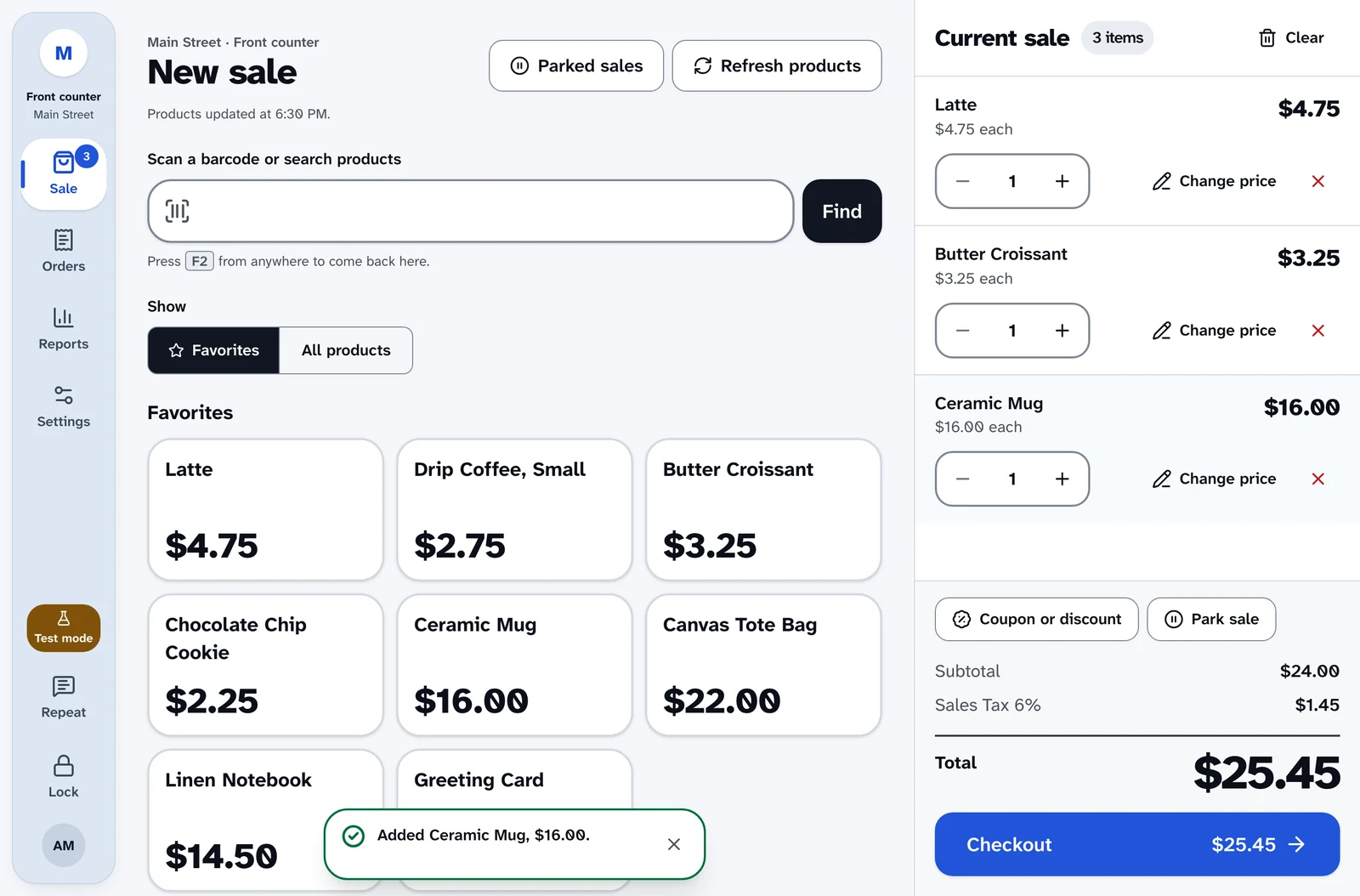
What the cashier hears
Every action, said once, in plain words.
Screen reader users hear what changed without hunting for it. Press F4 to hear the last one again.
- A barcode is scanned
- “Added Ceramic Mug, $16.00.”
- A search finds more than one
- “2 products match “mug”.”
- Favorites are showing
- “Favorites, 12 products.”
- Parked sales open
- “3 parked sales, newest first.”
- The page reloads mid-sale
- “Sale in progress restored: 3 items.”
- The sale is cleared
- “Sale cleared. The sale is empty.”
Finding products
Scan or search
Search by name or SKU, or scan with a USB or Bluetooth scanner that types like a keyboard. Press Enter to add the scanned product, or the only one that matches.
Every barcode WooCommerce knows
Codes match SKUs and WooCommerce's GTIN, UPC and EAN field, including variations, with leading zeros handled for you.
The camera as a backup
No scanner to hand? Scan QR, Code 128 and Code 39 barcodes with the device's camera.
Variations without the hunt
Variable products open a picker for size, color and the rest. The list shows "From" prices so nobody guesses.
Categories and layouts
Filter by category, and show products as a list, cards or large cards. Every price lines up on one right edge, even at 200% text.
A catalog that keeps up
Prices and stock refresh every five minutes while the register is idle, and when you come back to it. Only changes to what's on screen are announced.
Fast with a big catalog
Speed is checked by automated tests on every change, so a long product list never slows the counter down.
Thousands of products
The catalog loads in one compact request, and each refresh fetches only what changed. The tests cover stores with more than 2,000 products.
Quick on modest devices
With about 2,550 products and the processor slowed to a quarter of its speed, every tap and keystroke has to stay within a time limit.
Ready on a slow connection
The product grid has to appear within a time limit on a throttled 3G connection, and other screens load only when you open them.
Fewer trips to the server
Tap ten products in a row and the register checks prices with your site at most twice.
Favorites
Big tiles for best sellers
Up to 24 favorites per location, showing name and price. When a location has favorites, the Sale screen opens on them.
One switch away
A Favorites and All products switch changes the view, and says how many products are showing.
Curated without dragging
Supervisors search, add, remove and reorder favorites with Move up and Move down buttons. Nothing needs a mouse or a steady hand.
Never out of date
A product that's deleted or can't be bought drops out of favorites on its own.
The cart
Quantities with stock limits
Change quantities up to what's in stock, and hear when you reach the limit.
Price changes and discounts
Each one needs a reason, and a supervisor's approval unless you have permission. The new total is spoken after every change.
Coupons
WooCommerce coupons are checked before they're added. Choose which codes cashiers can use without asking a supervisor.
Totals priced like the order
The cart is priced the way the order will be, tax included, so the total never jumps at checkout.
Notes on the sale
Add a note to any sale. It stays on the order and out of the customer's emails.
Always in reach
On narrow screens a sticky bar keeps the total and Checkout on screen as the cart grows.
Parking a sale
Serve the next customer
Park sale puts a sale aside, with a name if you like, so the line keeps moving.
Recall tells you what changed
Recall says if a product is no longer sold, a price has changed or stock has dropped since the sale was parked.
Never rung up twice
Recalling removes the parked copy in the same step, so two registers can't both ring up the same sale.
Tidy by default
Each register keeps up to 20 parked sales, and they're cleared after seven days.
Customers
Walk-up sales
Most sales need no customer at all.
Find a customer fast
Search by name, email or phone with at least three characters. Phone search ignores formatting and works on part of a number.
Private at the counter
Results show only the last four digits of a phone and a masked email, so nothing private is read out or left on screen.
Add a customer
Create a WooCommerce customer account at the register. If the email is already in use, the register helps you find that customer instead.
Related
- Checkout and paymentsStripe Terminal card payments, cash with change due, split payments, tax-exempt sales and receipts.
- Returns and exchangesReturn items from any order, including web orders, and turn an exchange into same-day store credit.
- AccessibilityDesigned for blind and low-vision staff from the start, for JAWS, NVDA and VoiceOver.
- HardwareStripe smart readers, Star and Epson receipt printers, cash drawers and barcode scanners.
Ring up a sale yourself.
The live demo is the real register, running in your browser with nothing to install. Turn on your screen reader and try a full sale.